Wednesday, May 27, 2009

Adventures in EchoLink

In my ongoing quest to upgrade our family communication network (and avoid the cell phone trap) I have recently gotten an EchoLink node going at my QTH. This will allow me to call back to the house when I'm out on the road, especially when I take business trips up to the Twin Cities.

For hardware, I'm using a garbage-picked Toshiba laptop; most of the keycaps are popped off of it, so somebody dropped it into the dumpster. I got it up and going using an external keyboard, but now I don't really need the keyboard at all. More on that later. A homebrewed sound card interface and 2 meter transceiver completes the package.

I've set up the node in my shack for the moment, running to a simple copper pipe J-pole up on my roof. This has let me play around with different hardware and software configurations without too much stress. The Linksys router you see there is a WRT54G-TM running the extremely cool Tomato firmware (actually, it's running the Tomato VPN firmware because I hope to have a personal VPN connection going soon.) This was the result of one more excellent bit of advice from Chris, KF9OP. I was going to buy a dedicated wireless card for the laptop, but he suggested spending just a bit more and getting a router that can be flashed with new software to do any number of sophisticated wireless tasks. Great idea. I picked up a few of them for pretty cheap off of EBay. One is configured as my main Internet wireless access point, with gain antennas on it so the signal is available throughout the whole house. But then I've connected another, configured to operate as part of a Wireless Distribution System (WDS), to the computer running EchoLink.

It needs to be wireless because ultimately, when I have all the bugs worked out, the whole shebang is going up on my silo. The rig, computer, router, and power supply will sit just under the dome and I'll extend a mast above the dome with a nice 2 meter gain vertical on top. Then I should really get out like gangbusters. I've also got a gain vertical for 2.4 GHz that will be connected to the router, to boost the wireless path back to the house.

Since it's going to be at the top of the silo, I don't really want to have to climb up there every time I want to tweak a setting on the computer. So I installed the TightVNC server on the laptop. It allows me quick and easy remote access to that PC from my shack. In fact, there's even a TightVNC client for Puppy Linux, so I can access the laptop running Windows and EchoLink from my Linux machines. Now how cool is that?

I have not used the EchoLink much for family communications, although I have a business trip in the near future that should be a nice time to try it out. But I have had some delightful QSOs from hams who have just decided to "drop in". One afternoon I chatted with a student at the Milwaukee School of Engineering, connecting through their W9HHX node. Then later that evening, Al (W6AAX) called from Simi Valley, CA. He has family in the area and was wondering about the ham radio activity here.

And about fifteen minutes after I signed off with Al, Daryl (N5SCA) called from Lampasas, TX. It turns out he grew up in the La Crosse, WI area and was, again, wondering about ham radio activity in the area prior to a trek to a family reunion here later this year. Again, we had a nice chat and hopefully will be able to meet when he visits the area.

Wednesday, May 13, 2009

Puppy Linux

I have long yearned to cut the umbilical cord with Micro$oft, forsaking their operating systems forever. Why? Basically, because the ever-increasing thirst for computer resources (CPU, RAM, hard drive space, etc.) in exchange for little or no significant benefit in what I'm actually able to do with the computer drives me nuts. Let's face it, if you don't play some of the more resource-intense games (which I don't) then you simply don't need the vast majority of the horsepower of our current PCs. The main reason we need to keep upgrading hardware all the time is because Micro$oft orphans its older OSs. And each new OS from Redmond hogs more and more hardware resources in order to keep from running glacially slow.

Several years ago I set about building two PCs for our home use. I was highly motivated to utilize one of the many available Linux distros for the operating system. I had read and had been told that Linux was ready for prime time and that installation was simple, as was maintenance. And that is precisely what I needed because, while I am fairly PC savvy, I do not have a lot of time to waste horsing around trying to get things to work. An operating system needs to find all my hardware and work, with no muss and no fuss. Period.

Well, I tried Mandrake (now Mandriva) Linux, the Ubuntu/Kubuntu/Xbuntu line-up, and Knoppix. Each time there was something wrong, at least one thing (and sometimes more than one thing) that just made it a no go. So, in the end, I held my nose and forked out the $$ for two licenses of Windows XP (which hands down is the best OS that Micro$oft has ever released.)

But the desire to cut that cord has stayed with me. And I think maybe I've found the knife that's going to let me do it in the form of Puppy Linux. Puppy is not the most capable release. It's not the flashiest release. I tried it because several hams have chosen it specifically for their amateur radio-related software. And guess what? It works.

I have installed Puppy on six computers so far, from a 300 MHz Celeron with 128 MB of RAM up through a 2.2 GHz multi-core something-or-other with 2 GB of RAM. So far, Puppy has found and installed everything as it should. It has even found and installed a couple of rather obscure wireless adapters. Each time, I've been able to get onto my home network and out onto the Internet, which makes finding and fixing any little glitches much easier.

Its ability to install on really minimal hardware is the thing that thrills me the most. Puppy installs itself completely into RAM, so its performance even on minimal computer hardware is impressive. How totally stupid is it to be sending perfectly good desktops and laptops to the dump, when at least a significant percentage of them are still perfectly useful if all you want to do is surf the Web, do a little word processing, maybe keep track of your finances? And there are tons of ham radio tasks that can still be handled readily by lower-end hardware like this. Michael Barnes captures my thoughts exactly:

Using Puppy Linux brings back many memories of my early years using computers. Seeing Puppy Linux perform so well as a desktop Linux and taking up only 60 MB storage, one is reminded of how elegant programming used to be when computing used to be fun and useful with very little RAM and very little storage.

While some will argue that disk and RAM are cheap, generations of computers are being orphaned and the end user isn't seeing any improvements in either the application or environment. Puppy Linux not only provides the means to bring older computers back to life, it also provides the tools to create dedicated devices that can operate without a hard disk. It is possible to create media players, web terminals, email terminals, thin clients, x-terminals, and even Skype VoIP stations with very minimal hardware.

Thanks to a small distribution like Puppy Linux, it is possible to set up a fully functional workstation with a motherboard, low-cost processor, power supply, case, 128 MB DRAM and either a 128 MB thumb drive or a CDROM drive, at a cost of about $150 (USD) without a monitor.

No, forget $150. How about free? There are computers capable of running Puppy being thrown away all the time. Monitors too.

I think I'm going to use Puppy to resurrect two lower-end laptops I have kicking around the place, so my kids can use them for their school work. In fact, since it is a snap to get Puppy to boot from an inexpensive USB stick, I think it might be a nice idea to snarf a higher-end laptop off of EBay that's selling cheap because it has no hard drive and no operating system, then give it new life by running Puppy off of an 8 or 16 GB flash drive.

Specific ham radio groups and individuals like the West Australian Repeater Group and the creators of the digital mode software package FLDigi seem to have glommed onto Puppy Linux as a particularly appropriate platform. As I said, that's what got me looking into it in the first place.

It may very well be that other Linux distros would now perform much better for me than they did a few years ago. But I'm hooked on Puppy.

Tuesday, March 17, 2009

Making the Connection

In the aftermath of the very fun ARRL VHF-UHF 2009 Sweepstakes, I am in the process of trying to upgrade my VHF-UHF capabilities. I've got a number of antenna projects planned—yagis, halos, all the good stuff—and, of course, putting more antennas in the air means that you've got to run feedline and make a connection to your rig.

In the past, I would have rather blindly figured that, since they put an SO-239 connector on the back of my rig (even for 2 meter and 70 cm connections) it must be just fine to use that for VHF-UHF stuff. Well, I'm finding out that that is an incredibly naive view.

Many of you may already know this, but the PL-259/SO-239 combination does not maintain a constant impedance as the frequency increases. So down in the HF range, you're probably fine. But as the frequency increases into the VHF and certainly in the UHF range, the connector itself can start giving you an impedance mismatch and the mounting signal losses that go with such mismatches. N connectors maintain a constant impedence at much higher frequencies, hence their usefulness in VHF and especially UHF and microwave applications.

Here's what Chris, KF9OP my microwave guru has to say about the matter:

When I think PL259, I think vacuum tubes, the Ed Sullivan show and the 1950's.

Then there's the post-hippie 1970's BNC option for less than 50 watts and less than 250 MHz. However, BNC was only designed for less than 500 MHz, and its main benefit is ease of connection. If this isn't of value, then I would only use it because of cost/availability.

The 1980's man, uses N for more than 50 watts, SMA for less than 50 watts.

The 1990's man doesn't use connectors, since the 1 dB per connector hit is too great. He solders directly to the PCB ;)

The millennial man doesn't use coax at all! He integrates his radio into his antenna and runs his power/data up the tower. ;)
Now Chris is way out of whack with his estimate of 1 dB per connector; a properly installed connector, of the correct type for the frequency used should be more like 0.1 dB. But that last point is something that Chris and I have discussed a lot. Especially as you go up, up, up in frequency it makes less and less sense to spend big $$$ to try and corral that RF as it goes through a feedline. If you put the transmitter at the antenna you save all that expense and path loss. But since that's not always practical, one does sometimes need to run feedline.

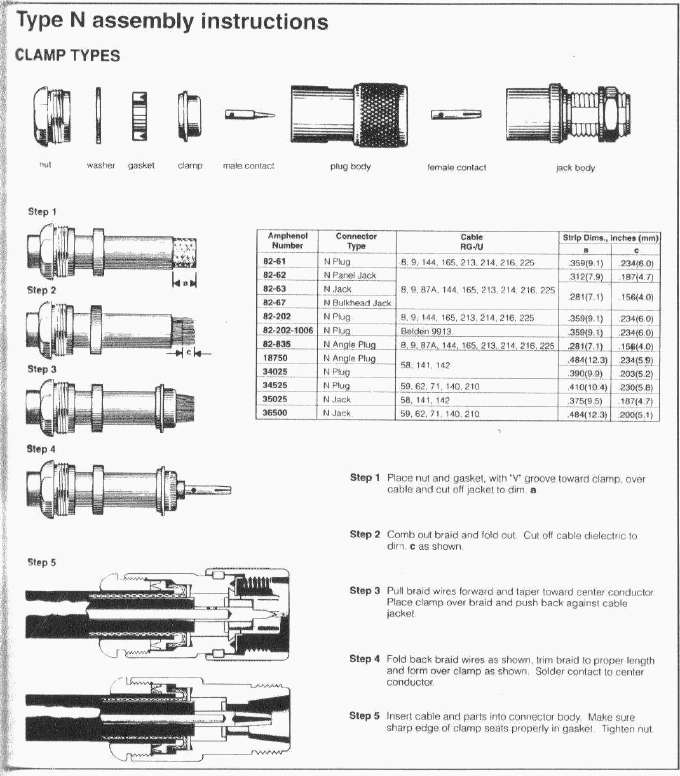
So, back to connectors, there was a good article on the installation of N connectors last year in QST magazine, "Those Type N Coax Connectors," in the April 2008 issue. Unfortunately, it's not on-line yet. But there is a diagram on this here. And there's an interesting exchange about the relative merits of the N connectors in ham radio applications over on EHam.net.

73 DE W9HQ

Wednesday, March 11, 2009

In Honor of Richard David (SK), the Original W9HQ

When I upgraded to an Extra class license and changed my call sign to W9HQ, I wondered about the man who had held this call sign before me. I did some initial searching back then, but came up empty on any specifics. Then the pressing details of life pushed that search out of the way. Early this year, I began searching again in order to put some information about him on this blog. Alas, I found the news that Mr. Davis had died just a few days before. I had missed the opportunity to correspond with him.

I believe that it is crucial to remember those radio amateurs who have gone before us. I am honored to have the call sign W9HQ and I want to make sure that I pay proper tribute to the man who held it before me. So far I have only been able to secure the published obituary and a beautiful tribute to Mr. Davis from a woman who stayed with that family as a foreign exchange student. He sounds like a wonderful person. I will be adding more information about his professional life and his ham radio activities as I am able to learn about them.

I would also like to ask all to pray for the repose of his soul.

Requiem aeternam dona ei, Domine, et lux perpetua luceat ei. Requiescat in pace. Anima eius et animae omnium fidelium defunctorum per misericordiam Dei requiescant in pace.

(Eternal rest grant him, O Lord, and perpetual light shine upon him. May he rest in peace. May his soul and all the souls of the faithful departed, through the mercy of God, rest in peace.)

SOUTH BEND -- Richard A. "Dick" Davis, 93, of South Bend, died at 11:30 a.m. Tuesday (Jan. 13, 2009) in The Sunset House of Mishawaka.

He was born Sept. 27, 1915, in LaPorte to Arthur S. and Louise (Wendt) Davis. On April 8, 1938, he married Marie E. Spromberg in South Bend.

She survives in Mishawaka along with two daughters, Kathryn L. (Gary) Wilson of Markle and Liese M. (Tom) Kreiser of Elkhart; one son, Dr. Timothy E. (Sandy) Davis of Elkhart; one adopted daughter, Gilly Simpson of Tunbridge Wells, Kent, England; eight grandchildren; and six great-grandchildren.

One brother, William Davis, and one granddaughter, Megan Wilson, preceded him in death.

Mr. Davis was a 1933 graduate of Central High School, South Bend. He began working at Bendix Corp. as a mail clerk and delivered the mail around the plant on roller skates. He retired in 1979 as supervisor of the aerospace division after more than 40 years of service. He had been active in the Boy Scouts, attaining the rank of Eagle Scout.

He was a longtime ham radio operator with the call signal W9HQ, and a member of Community Congregational Church of South Bend, Bendix Retirees Club and the Izaak Walton League. Mr. Davis, aka the "Watchdog of Juday Creek," fought off developers and pollution sources to preserve the creek, one of Indiana's last naturally spring-fed waterways. He designed and built his own home and cabinets, built dollhouse furniture for his daughters and volunteered at the Clay Township branch of the South Bend Public Library after his retirement, where he devised a method of repairing the bindings of old books that was adopted by other area libraries.


Tuesday, February 3, 2009

Do It Yourself

A number of hams bemoan the fact that it is more and more difficult to build your own gear these days. What with the very powerful trend in electronics toward surface mount devices (SMDs) and unbelievably compact integration, it is indeed extremely hard to build anything that comes close to rivaling purchased gear, at least in terms of the radios themselves.

For this and other reasons, it is probably true that more hams than ever are "appliance operators", that is, they simply buy their gear off the shelf, plug it in, and start communicating. And frankly, in my opinion there's nothing wrong with that. Let's face it, if we are going to draw some imaginary line in the sand and say, "Ham radio as a hobby was ruined when [fill in arbitrary event here]", then there's really no reason why the line shouldn't be drawn at spark gap transmitters and crystal receivers.

But that is not what ham radio has ever been about. It is intrinsically a technical hobby. If somebody likes working with older radios and decades-old technology, fine. But the hobby itself has always been about technical innovation and advancement of the state-of-the-art. (Frankly, a lot of the technical innovation available to hams is on the software side of things and that's something I'd like to explore in a future posting.) And, as always, it's also about having fun. There is plenty of that to be had, even if one must needs fall short of homebrewing a complete modern transceiver. Those with a hardware bent can still build lots of interesting and useful devices. Any given edition of the The ARRL Handbook and most issues of QST magazine have projects of varying degrees of difficulty that are well within the reach of most hams.

Here's a simple one that I did, a rig control cable for my Icom IC-746. These things will set you back $15-25, depending on where you buy them, but they're dirt simple to build. I just cobbled mine together on a piece of perf board, using parts I scrounged from other bits of trashed electronics. My total cost was exactly $0.00. I used the G3VGR circuit found here:

http://www.qsl.net/g3vgr/civ.html

Super simple, super cheap, works great. (There's an even simpler circuit in the 2008 ARRL Handbook.) I have a similar interface for my Yaesu FT-897D. I control both rigs simultaneously from Ham Radio Deluxe. Cool.

I've also built computer-rig interfaces for digital modes like PSK-31.

Here's a list of stuff I'd like to build in the future:

  • Remote antenna switch (I'm actually working on one right now)
  • Battery charge controller for solar operation (I'm working on that now too)
  • Balanced antenna tuner
  • Audio break-out box
  • Keying circuit for my Heathkit amplifier
  • Active attenuator for foxhunting
  • QRP CW transmitter (or perhaps even a transceiver)
  • QRP antenna tuner
  • ????
There's a few years of projects for a busy guy like me. And of course, this leaves aside for now the myriad interesting antennas that one can build.

I'll keep you posted.

73 DE W9HQ

Tuesday, January 27, 2009

The Vanity Call Sign Dilemma

I have decidedly mixed feelings about the whole vanity call sign system, despite being the holder of a really cool vanity call, W9HQ. My mixed feelings come from a clash between my traditional and nostalgic side, which loves things which are venerable, solid, tried and true versus my pragmatic side which hates to see a good thing go unused. (The call sign [not a vanity!] to the right is that of a ham who makes some really nice and reasonably priced wooden replications of your call. Check out his Web site. I've put this down on my "gift list", so maybe I'll get one from my wife.)

Let's start with the nostalgia. When I was a kid, you knew darn good and well that somebody who held a one by two call with a "W" in front was a venerable old-timer. You knew that he was an Extra class ham who had earned that license level by achieving a high level of Morse code proficiency (20 words per minute) and had mastered some pretty intense technical material in order to be able to take the FCC's highest level exam. You also knew that he had been in the hobby a pretty long time, because the FCC was only giving out 1x2 calls to hams who had been Extras for at least 25 years and they ran out of the one by two W calls well before I got into the hobby. They were, in a word, venerable.

Nowadays, with the new vanity system, a guy could very easily get an Extra class license after only a very short time as a ham, apply for a W#xy call, and look veritably ancient. I've been in the hobby quite a while (albeit with a pretty long hiatus in between periods of activity), but I really don't feel worthy of such a call. So there's a part of me that wants to keep those "golden oldie" call signs out of circulation, because of what they represent.

But then kicks in the pragmatic part of me. These are good call signs; what's wrong with keeping them in use? Indeed, although its parameters are much broader now than they used to be, the history of "vanity" call signs isn't quite as straightforward and restrictive as one might think:

As older hams became Silent Keys and the number of available 1x2 calls increased, the FCC instituted a program effective in 1968 whereby those licensed for 25 years and currently holding an Extra license would be eligible for a non-specific (sequential) 1x2 callsign. The length of time one needed to be an Extra was gradually reduced, until July 1977, when any Extra Class could apply for a 1x2 . . .

Effective July 1, 1976, any Extra class licensee who had been a licensed Amateur for 25 years or more could select one specific 1x2 call sign. This added the ability to pick a specific call, but did not change eligibility. . . .

Effective July 1, 1977, any Amateur Extra class licensee could select one specific 1x2 call sign. Effective March 30, 1978 this was all replaced by the strict "sequential" system until the advent of "vanity" call sign selection in March 24, 1995 (Amateur Radio History).

So it wasn't like these call signs remained ever out of circulation once the original holder died. They were recirculating them at least forty years ago. It's just that the rules are quite a bit looser now.

So where does that leave me in the end? In the end, I decided to upgrade from Advanced to Extra when my son took his Technician test, even though I'm not thrilled with the loosening of the requirements to do so. And although I was happy with my original call of N0CVR, I live in "9" land now so changing my call sign to a "9" designator made sense. When I looked into what was available on the FCC database in terms of vanity call signs, I saw that W9HQ was coming up very soon. The way the system is set up, that call sign isn't going to be set aside for posterity—somebody's going to get it. So nostalgia gives way to pragmatism and that somebody might as well be me.

But pragmatism has its limits and becomes truly noxious if it ends up rendering us oblivious and careless about the past. There are things that the holder of such a venerable call sign as mine can do to perpetuate its legacy and honor its original holder(s). And that is the subject of a soon-coming posting.

73 DE W9HQ

Microwaves: What's the Use?

I had an interesting exchange about microwaves and their usefulness with my friend and colleague, Chris Vanderkoy (KF9OP). Now just by way of background, Chris and I work for the same company, me as a lead test engineer for industrial controls products and Chris as the RF engineer in charge of designing the radio hardware for the company's wireless sensor and controls products (in the 2.4 GHz band.) So Chris is a die-hard microwave guy. In fact, he refers derisively to anything less than 500 MHz as "DC".

But that's just not me. I like HF a lot and am only just now getting turned on to VHF/UHF stuff. Some time ago I was asking Chris about feedlines. He stated:

I wouldn't buy LMR400 for less than 50mhz. At those frequencies, you can get by with a series of coat hangers for your feed line....(well, not really....)


His reply didn't exactly tick me off, but it did seem mighty uppity. So I shot back with a challenge:

Ya know, I realize that actually building the radios is more of a challenge, but the problem is that the darn microwaves don't do anything interesting. They don't bounce off anything in the ionosphere but they do get scattered by everything under the sun. They get sucked in by every water-bearing obstacle (spelled TREES) in their path. They don't even bend to give you just a teensy bit more than line-of-sight. So you have to build a 400 foot tower just to get out. What's the use?


I thought that would put an end to his smart alecky ways. But no, KF9OP shot back with a detailed list of 10 good reasons to look at microwaves Here you go:

Microwave's benefits.

1) Wide Bandwidth (lots of space for everybody)

2) Wide Bandwidth (hard for others to find you if they don't know where to look.)

3) Easy to build Hi gain antennas. (30dBi parabolic dish is reasonable)

4) Good for Satellite communications.

5) 1/f noise much less at these frequencies.

6) If you point your dish to the sky, you can get ultra low noise floors.

7) Awesome directivity (send the RF where you want it).

8) Can't moonbounce at HF.

9) Different freq's get absorbed by different gasses (this phenomenon is a benefit not a problem. CO2 sensors use this phenomenon to detect the gas.

10) You can use microwave energy to see through walls and penetrate concrete/earth/etc. (cool for discovery of underground caves, oil, etc...)

I guess I don't think of microwave frequencies as a place you call for CQ, but rather a frontier of research that has all kinds of gold nuggets waiting to be discovered.

Ham radio is cool because it is cutting edge... 300GHz is definitely an edge.


So there you go. Microwave communication and experimentation might not be your cup of tea. But that's the great thing about ham radio. There are myriad facets of the hobby and you can almost always find some other folks who are interested in doing what you're doing. (But they had better be close if you want to talk to them with those puny microwaves ;o)

The bottom line is, I'm learning more and more to never say never. I didn't ever think I'd be all that enthusiastic about VHF/UHF weak signal stuff, but here I am reading and planning on how to significantly improve my station in that area. Who knows? Maybe someday I'll be as big a microwave aficionado as KF9OP.

73 DE W9HQ